

Appearance
Webhooks
Webhooks let CometCMS notify an external URL whenever content changes. The primary use case is triggering SSG (static site generator) rebuild jobs — but any HTTP endpoint can receive these events.
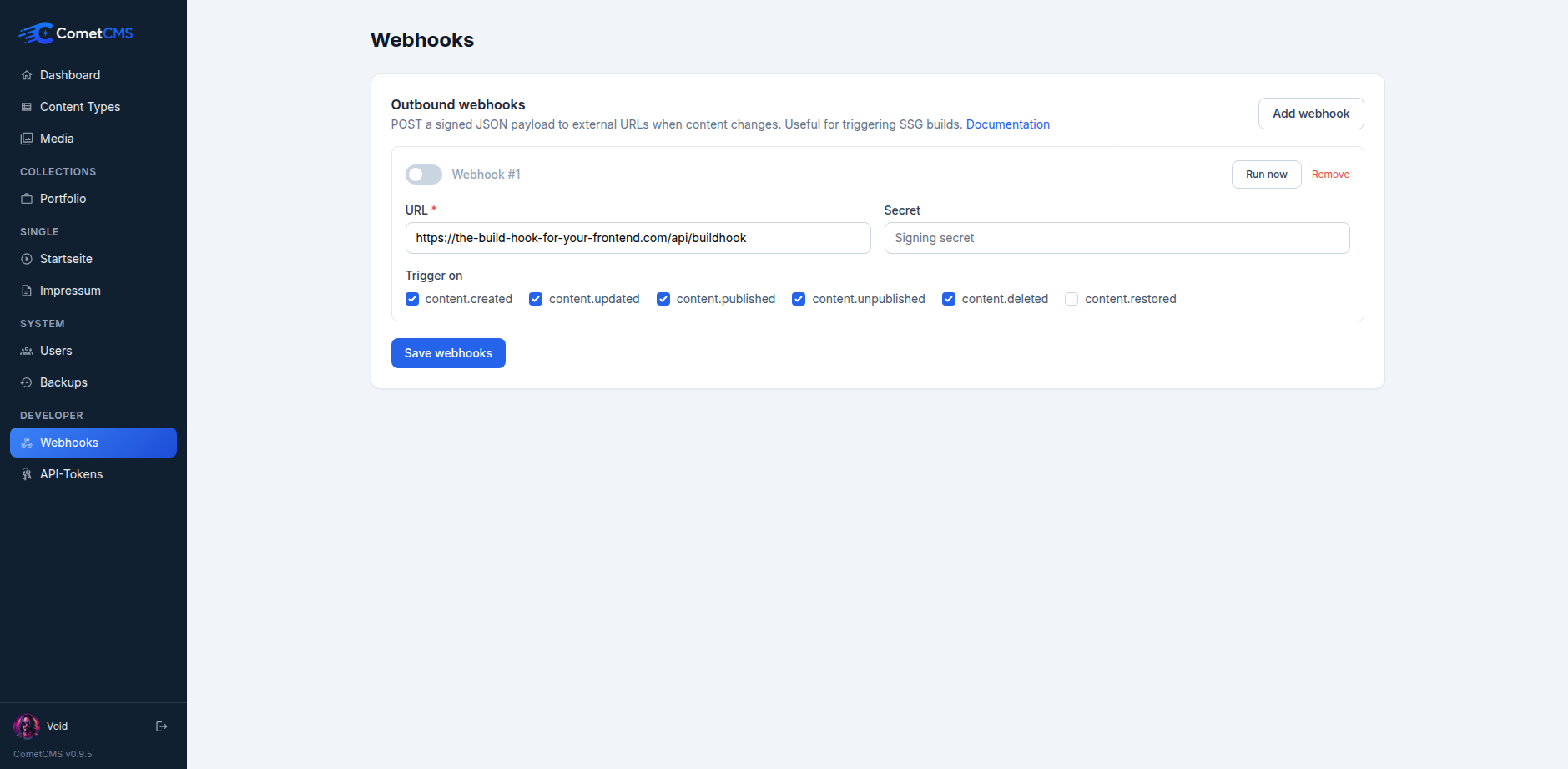
Configuration
Webhooks are configured in the Webhooks page of the admin (under System → Webhooks). Each webhook has:
| Field | Description |
|---|---|
| URL | The HTTPS endpoint that will receive POST requests. |
| Secret | A shared secret used to sign the payload. Keep this private. |
| Trigger on | The subset of events that should fire this webhook. |
You can configure multiple webhooks, each listening to a different set of events.
Events
| Event | Fired when … |
|---|---|
content.created | A new entry is saved for the first time. |
content.updated | An existing entry is saved. |
content.published | An entry transitions to published status. |
content.unpublished | A previously published entry leaves published status. |
content.deleted | An entry is soft-deleted (moved to trash). |
content.restored | An entry is restored from the trash. |
Payload format
Every webhook request is an HTTP POST with Content-Type: application/json:
json
{
  "event": "content.published",
  "occurred_at": "2025-05-03T12:00:00Z",
  "data": {
    "type": "posts",
    "id": "7K4p9xQ2mR",
    "slug": "my-first-post"
  }
}event— the event name from the table above.occurred_at— ISO 8601 timestamp in UTC.data.type— the collection name (e.g.posts,pages).data.id— the stable opaque ID of the affected entry.data.slug— the URL-safe slug of the affected entry. Use eitheridorslugto fetch the entry from the Public API.
Lightweight by design
The payload intentionally contains only the event and a reference to the entry. Use the Public API to fetch the full entry if your handler needs the content.
Signature verification
Every request includes an X-CometCMS-Signature header. Its value is:
sha256=<HMAC-SHA256 hex digest>The signature is computed over the raw request body using your webhook secret as the key. Always verify this signature before processing the event.
Node.js
js
const crypto = require("crypto");

function verifySignature(rawBody, secret, signature) {
  const expected =
    "sha256=" +
    crypto.createHmac("sha256", secret).update(rawBody).digest("hex");
  return crypto.timingSafeEqual(Buffer.from(expected), Buffer.from(signature));
}
PHP
php
function verifySignature(string $rawBody, string $secret, string $signature): bool {
    $expected = 'sha256=' . hash_hmac('sha256', $rawBody, $secret);
    return hash_equals($expected, $signature);
}
Python
python
import hmac, hashlib

def verify_signature(raw_body: bytes, secret: str, signature: str) -> bool:
    expected = 'sha256=' + hmac.new(
        secret.encode(), raw_body, hashlib.sha256
    ).hexdigest()
    return hmac.compare_digest(expected, signature)
Example: triggering a Netlify build
- In Netlify, go to Site settings → Build hooks and create a new hook. Copy the hook URL.
- In CometCMS, open Webhooks and add a webhook with:
- URL — your Netlify hook URL
- Secret — any random string (Netlify doesn't verify signatures, but CometCMS sends one regardless)
- Trigger on —
content.published,content.unpublished
- Publish or unpublish a post — Netlify will start a new build automatically.