Appearance
Managing Users
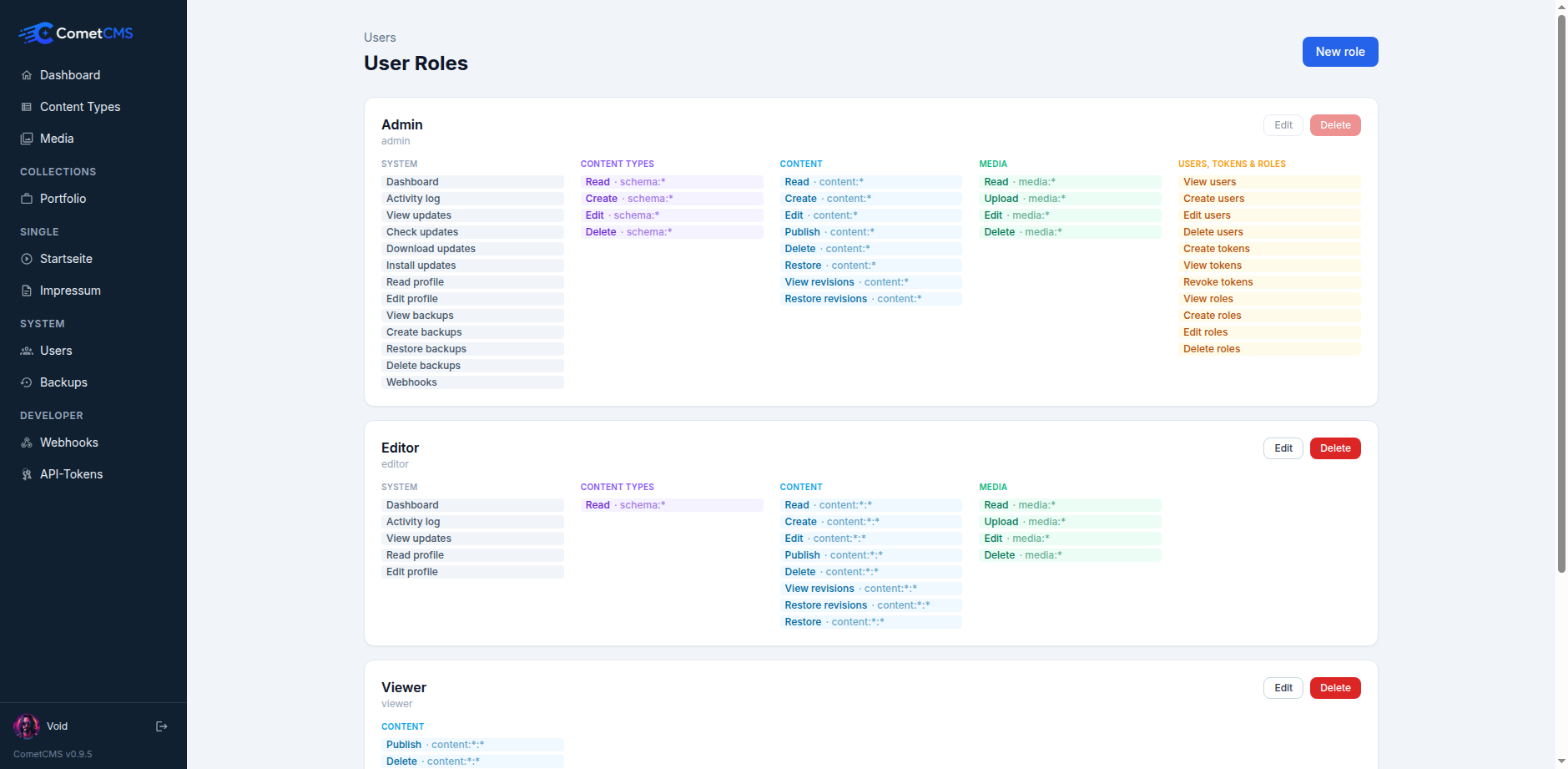
User roles
Roles define the permission grants users receive. A user has exactly one role, and changing the role changes the user's effective permissions.
| Built-in role | Default grants |
|---|---|
admin | All system, content type, content, media, user, token, role, backup, webhook, and update permissions. |
editor | Dashboard, activity, updates, profile, schema reads, content, and media writes. |
viewer | Dashboard, activity, updates, profile, schema reads, content reads, media reads. |
Use Edit user roles from Users to create roles or change their grants. The admin role cannot be deleted.
Viewing users
Navigate to Users in the sidebar. Users are grouped by role: Admins → Editors → Viewers.
Creating a user
- Click New user.
- Enter a username, password (min 8 characters), and role.
- Click Create.
Editing a user (admin only)
Admins can click the Edit button on any other user's card to update their display name, email, role, or set a new password. You cannot edit your own account from this page — use your profile page instead.
Deleting a user
Click Delete on a user's card. This removes the user account only — any content they created (author_id) is not affected and remains intact.
Your profile
Click your name or avatar in the bottom-left corner of the sidebar to open your profile page. From there you can:
- Upload or remove your profile picture.
- Update your display name and email.
- Change your password (current password required).